

 Kosár
Kosár- 3D nyomtatás
- Adathordozók
- Ajándékok, ajándékutalványok
- Analóg áramkörök
- Audiotechnika
- Autó HiFi
- Biztosítékok
- Csatlakozók
- Csomagolás és tárolás
- Digitális áramkörök
- Diódák
- Elemek, Akkuk, Töltők
- Ellenállások, Potméterek
- Építőkészletek (KIT, Modul)
- Erősáramú szerelés
- Fejlesztőeszközök
- Foglalatok
- Hobbielektronika.hu
- Induktivitás, Transzformátor
- Kábelek, Vezetékek
- Kapcsolók, Relék
- Készülékek
- Kishangszórók, Piezók, Mikrofonok
- Kondenzátor
- Kristályok
- Matricák, Feliratok
- Méréstechnika
- Mini PC, ipari PC, tartozékok
- Modulok
- Modulvilág
- Motorok, Ventilátorok, Fűtőelemek
- Munkavédelmi eszközök
- Műszerdobozok
- Napelemek és tartozékok
- NYÁK-ok
- Okosotthon, Lakáselektronika
- Oktatási eszközök
- Optoelektronika
- Peltier modulok
- Pneumatika
- Szenzorok
- Szerelési segédanyagok
- Szerszám és forrasztás
- Tápegységek, Adapterek
- Tranzisztorok
- Varisztorok
- Vegyszerek, ragasztók
- Zavarszűrők, Ferritek
CN1509
Step down tápegység modul feszültségmérővel, 7...40V DC - 5V DC USB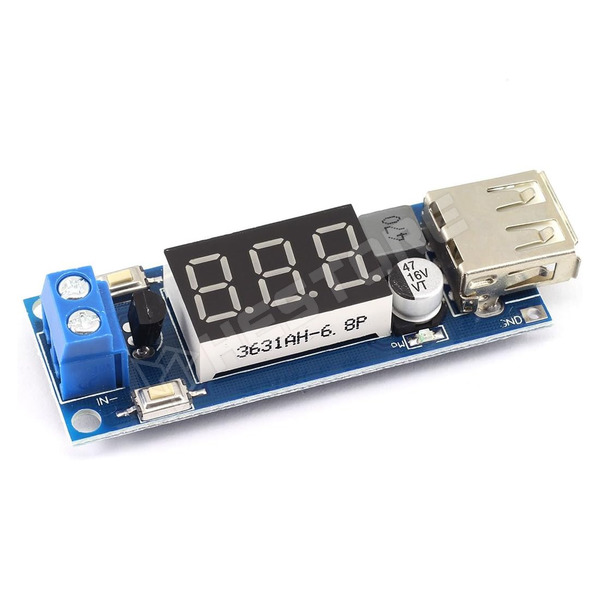
Összefoglaló, rendeltetés
A 7-40V DC bemeneti feszültségből stabil 5V DC USB kimenetet biztosító step-down modul ideális mobil eszközök töltésére és tápellátására. Integrált feszültségmérővel, csavaros bemeneti és USB-A kimeneti csatlakozókkal, valamint túláram, túlmelegedés és fordított polaritás elleni védelemmel, 2A kimeneti árammal működik.
1. Ezen a modulon alapértelmezetten a Data+ és Data- rövidzárban van, ami a legtöbb eszköz töltéséhez megfelelő. Amennyiben azonosító ellenállás hozzáadására van szükség, vágja el a D+ és D- közti vezetősávot.
Használati utasítás:
1. Bekapcsolás után a feszültségmérő megjeleníti a bemeneti feszültséget.
2. Az 5V-os USB kimenet be- vagy kikapcsolásához nyomja meg az "Output Enable" gombot az IN- mellett. Az USB tápellátás jelző LED-je világítani kezd.
3. Ha szeretné be- vagy kikapcsolni a digitális kijelzőt, nyomja meg az IN+ melletti "Low Power" gombot.
A modul megjegyzi a beállításokat, így ha kikapcsolta a kijelzőt, vagy a kimenetet, újraindítás esetén is ki lesznek kapcsolva.
Kalibráció:
1. Normál üzemállapotban nyomja hosszan az "Output Enable" gombot 2 másodpercig, majd engedje el, a feszültségmérő villogni kezd.
2. Az "Output enable" gombbal a kijelzett feszültség egy egységgel növelhető, a "Low Power" gombbal csökkenthető. (egy egység = 0.1V)
3. A feszültség beállítása után tartsa lenyomva az "Output Enable" gombot 2 másodpercig, majd engedje fel.
Kikapcsolás esetén a paraméterbeállítások automatikusan mentésre kerülnek.
| Kimeneti feszültség | 5V DC |
|---|---|
| Bemeneti feszültség | 7...40V DC |
| Kimeneti áram | 2A |
| Tápegység típusa | állandó feszültségű |
| Védelem | Túlmelegedés, biztosítás fordított polaritás ellen, Túláram |
| Méretek | 60 x 20mm |
| Kimeneti csatlakozó fajtája | USB-A aljzat |
| Bemeneti csatlakozó fajtája | csavaros szorítók |
| Konverter típusa | DC/DC |
Bővített forgalmazói/gyártói információk (EU 2023/988 rendelet)
Kereskedelmi név: HESTORE Hungary Kft
Postai cím: 1163. Budapest, Cziráki utca 26-32
Elektronikus cím: https://www.hestore.hu/
Cikkszám: 100.463.44

Mennyiség (db):
Egységár ÁFA nélkül
| 1+ | 1 021 Ft |
|---|---|
| 5+ | 812 Ft |
| 10+ | 777 Ft |
| 20+ | 753 Ft |
| 50+ | 726 Ft |
* A megjelenített ár az egyéni beállításnak megfelelően nettó (ÁFA nélküli) ár, mely már tartalmazza az esetleges egyedi kedvezményt, szállítási költség nélkül.
Módosításához kattintson a fejléc  ikonjára.
ikonjára. | Elérhetőség | Menny. |
|---|---|
| Raktáron | > 50 |
| 10-15 munkanap | > 20000 |
Kérdése van?
Írjon nekünk most!Vásárolták még
A következő termékeket más vásárlók rendelték a fent említett modellel együtt. Kérjük, ellenőrizze a kiválasztott termékek kompatibilitását.


 | Weboldalunk helyes működéséhez sütit készítünk az Ön böngészőjében. |
 A csomagküldés a magyarországi HESTORE raktárból történik.